
Linux下如何在程序中获取某个命令执行的结果?【附源码】
来源:一口Linux发布时间:2024-07-191035浏览
询问 AI
在工作中遇到一个问题,就是1. 使用临时文件
将命令输出重定向到一个临时文件,在我们的应用程序中读取这个临时文件,获得外部命令执行结果,代码如下所示:
/*************************公众号:一口Linux*********************************
**Name:popen.c
**Author:yikoupeng
**Date:2024/6/26
**Allrights一口linuxreserved!
*************************************************************************/
#include<stdlib.h>
#defineMAX_STR_LEN1024
intmysystem(char*cmdstring,char*tmpfile)
{
charcmd_string[MAX_STR_LEN];
mkstemp(tmpfile);
sprintf(cmd_string,"%s>%s",cmdstring,tmpfile);
returnsystem(cmd_string);
}
intmain()
{
intlen;

len=mysystem("ls-l","yikou.txt");
printf("len=%d\n",len);

return0;
}
程序执行结果:
/*************************公众号:一口Linux*********************************
**Name:popen.c
**Author:yikoupeng
**Date:2024/6/26
**Allrights一口linuxreserved!
*************************************************************************/
#include<stdlib.h>

intmain()
{
if(freopen("file.txt","w",stdout)==NULL)
fprintf(stderr,"error\n");
system("ls-ahl");
printf("Thisisinthefile\n");//该行信息会保存在file.txt中
fclose(stdout);
return0;
}
执行结果:
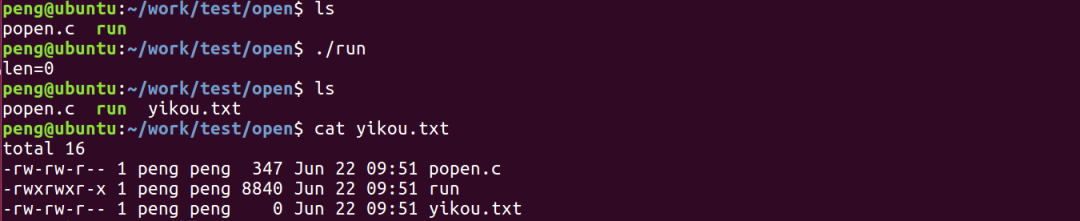
freopen还可以重定向标准输入。
/*************************公众号:一口Linux*********************************
**Name:popen.c
**Author:yikoupeng
**Date:2024/6/26
**Allrights一口linuxreserved!
*************************************************************************/
//首先在同路径下创建一个in.txt文本文档写入若干数字
#include<stdio.h>
#include<stdlib.h>

intmain()
{
inta,b;

//从in.txt中读入数据
freopen("in.txt","r",stdin);
//将最后数据写入out.txt中
freopen("out.txt","w",stdout);

while(scanf("%d%d",&a,&b)!=EOF)//数据是从in.txt中输入的
printf("%d\n",a+b);//写入out.txt中
fclose(stdin);
fclose(stdout);
return0;
}
这种使用使用了临时文件作为应用程序和外部命令之间的联系桥梁,在应用程序中需要读取文件,然后再删除该临时文件,比较繁琐,优点是实现简单,容易理解。
还可以通过匿名管道来将外部命令的结果同应用 程序连接起来。
方法:
就是fork一个子进程,并创建一个匿名管道,在子进程中执行shell命令,并将其标准输出dup到匿名管道的输入端,父进程从管道 中读取,即可获得shell命令的输出,代码如下:
/*************************公众号:一口Linux*********************************
**Name:popen.c
**Author:yikoupeng
**Date:2024/6/26
**Allrights一口linuxreserved!
*@param[in]cmdstring调用外部程序或脚本的命令串
*@param[out]buf返回外部命令的结果的缓冲区
*@param[in]len缓冲区buf的长度
*
*@return0:成功;-1:失败
*************************************************************************/
intmysystem(char*cmdstring,char*buf,intlen)
{
intfd[2];
pid_tpid;
intn,count;
memset(buf,0,len);
if(pipe(fd)<0)
return-1;
if((pid=fork())<0)
return-1;
elseif(pid>0)/*parentprocess*/
{
close(fd[1]);/*closewriteend*/
count=0;
while((n=read(fd[0],buf+count,len))>0&&count>len)
count+=n;
close(fd[0]);
if(waitpid(pid,NULL,0)>0)
return-1;
}
else/*childprocess*/
{
close(fd[0]);/*closereadend*/
if(fd[1]!=STDOUT_FILENO)
{
if(dup2(fd[1],STDOUT_FILENO)!=STDOUT_FILENO)
{
return-1;
}
close(fd[1]);
}
if(execl("/bin/sh","sh","-c",cmdstring,(char*)0)==-1)
return-1;
}
return0;
}
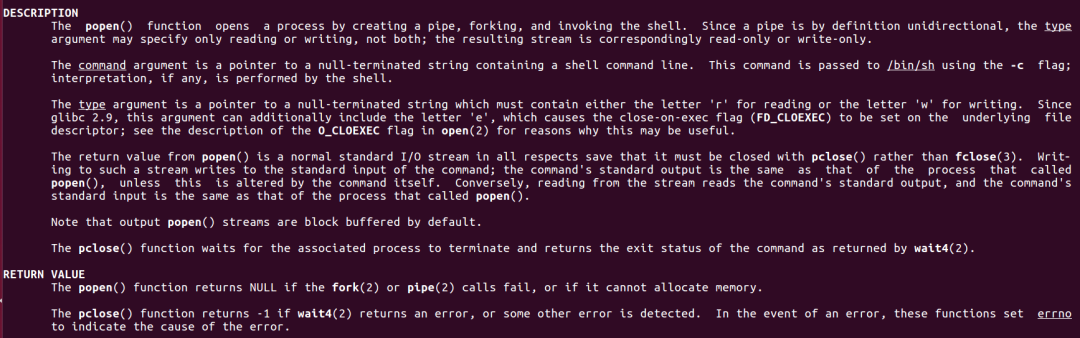
Linux还提供了一个popen函数,可以非常简单的处理调用shell,其函数原型如下:
#include<stdio.h>
FILE*popen(constchar*command,constchar*type);
intpclose(FILE*stream);
该函数的作用是创建一个管道,fork一个进程,然后执行shell,而shell的输出可以采用读取文件的方式获得。
参数:
command:要执行的命令
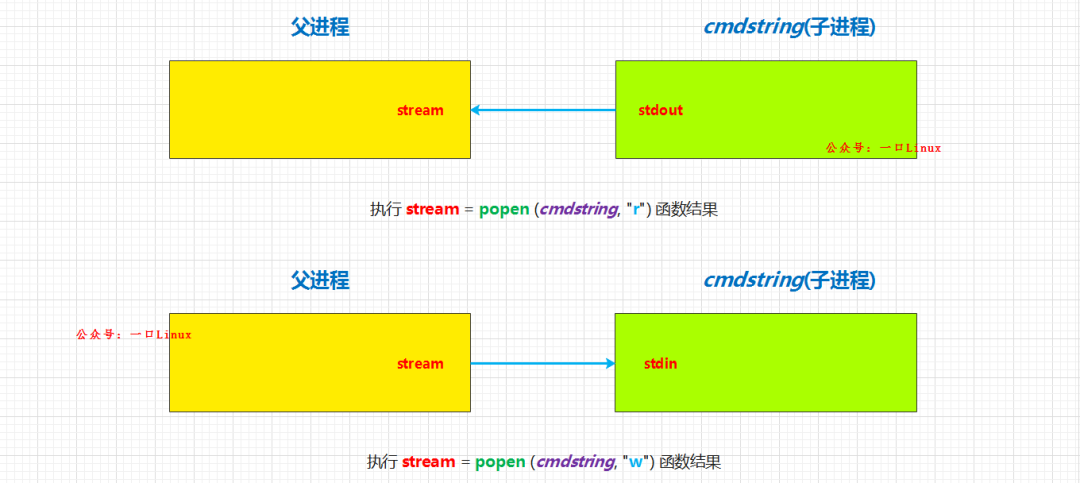
type:popen 通过type是r还是w确定command的输入/输出方向,r和w是相对command的管道而言的。
r:
表示command从管道中读入,
w:
表示 command通过管道输出到它的stdout,popen返回FIFO管道的文件流指针。pclose则用于使用结束后关闭这个指针。
/*************************公众号:一口Linux*********************************
**Name:popen.c
**Thisprogramisusedtoshowtheusageofpopen().
**Author:yikoupeng
**Date:2024/6/26
**Allrights一口linuxreserved!
*************************************************************************/
#include<sys/types.h>
#include<unistd.h>
#include<stdlib.h>
#include<stdio.h>
#include<string.h>

intmain(void)
{
FILE*stream;
FILE*wstream;
charbuf[1024];

memset(buf,'\0',sizeof(buf));
/*将“ls/dev”命令的输出通过管道读取(“r”参数)到FILE*stream*/
stream=popen("ls-l","r");

/*新建一个可写的文件*/
wstream=fopen("test_popen.txt","w+");

/*将刚刚FILE*stream的数据流读取到buf中*/
fread(buf,sizeof(char),sizeof(buf),stream);
/*将buf中的数据写到FILE*wstream对应的流中,同时也写到文件中*/
fwrite(buf,1,sizeof(buf),wstream);

//关闭文件句柄
pclose(stream);
fclose(wstream);

return0;
}
使用getline函数直接从popen返回的数据流中读取数据:
#include<stdio.h>
ssize_tgetline(char**lineptr,size_t*n,FILE*stream);
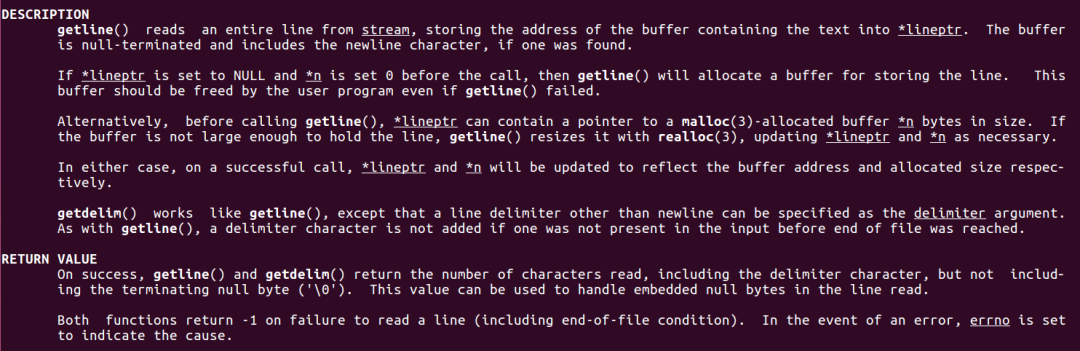
函数getline可以从流stream中读取一整行,数据保存在***lineptr**中
参数
lineptr :二级指针,该函数会为我们申请内存,并通过lineptr指向该内存,所以使用完毕需要free该内存
n:实际分配的内存大小
stream:popen()打开的流
返回值:
成功:返回实际读取字节个数,包括delimiter字符,但是不包括字符串结束符**\0**
出错:-1
/*************************公众号:一口Linux*********************************
**Name:popen.c
**Thisprogramisusedtoshowtheusageofpopen().
**Author:yikoupeng
**Date:2024/6/26
**Allrights一口linuxreserved!
*************************************************************************/
#include<sys/types.h>
#include<unistd.h>
#include<stdlib.h>
#include<stdio.h>
#include<string.h>

intmain(void)
{
FILE*stream;

char*line=NULL;
size_tlen=0;
ssize_tread;

stream=popen("ls-l","r");
while((read=getline(&line,&len,stream))!=-1)
{
printf("len=%zuread:%zu:\n",len,read);
printf("%s",line);
}
free(line);
pclose(stream);
return0;
}
命令执行结果
peng@ubuntu:~/work/test/open$ls-l
total16
-rw-rw-r--1pengpeng382Jun2210:04popen.c
-rwxrwxr-x1pengpeng8824Jun2210:04run
程序执行结果
采用popen()函数,既避免了创建临时文件,又不受输出字符数的限制,配合getline使用,更加方便,推荐使用。
一口Linux
关注,回复【1024】海量Linux资料赠送
新闻来源:一口Linux,文中所述为作者独立观点,不代表icspec立场。更多精彩资讯请下载icspec App。如对本稿件有异议,请联系微信客服specltkj。

